
XTRF is the business management system offered by XTRF Management Systems (https://www.xtrf.eu/). It is available in hosted and installed versions as well. BeLazy offers a very deep integration with XTRF, with thousands of hours spent experimenting and improving our capabilities, also cutting back on API calls as much as possible.
Requirements:
Please refer to the article about Preparing XTRF for connecting to BeLazy.
Expected URL format:
The URL (in the case of XTRF-hosted instances) is https://company.s.xtrf.eu.
Configuration:
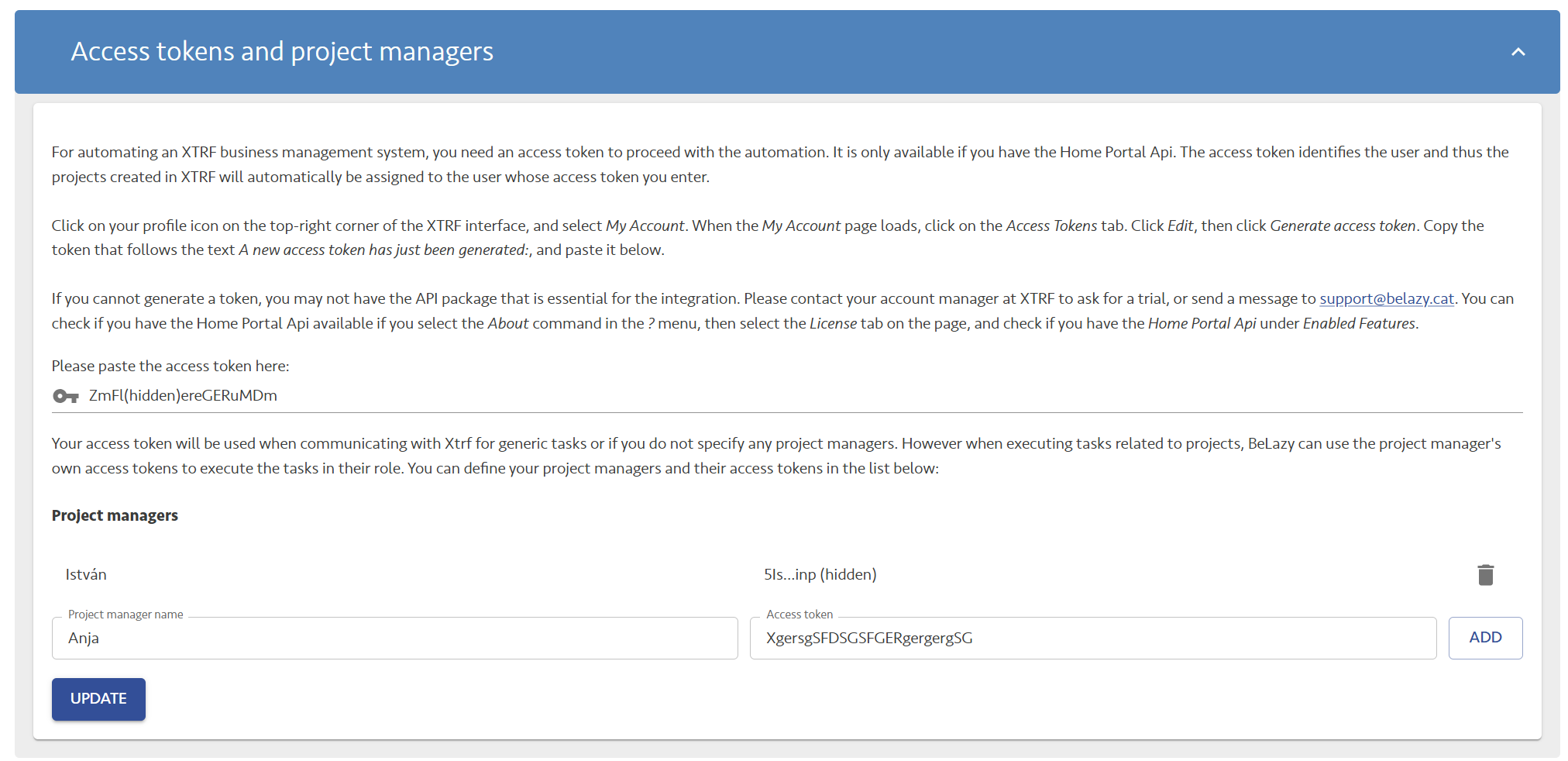
- You need to enter the API access token that you can generate in XTRF. The onboarding process gives you more information.
- As XTRF's API impersonates users and does not allow changing the project manager, BeLazy needs API access tokens created for each XTRF user that will be assigned by BeLazy as a project manager. You can enter these together with the names of the users under Manage my business management system in the profile menu.
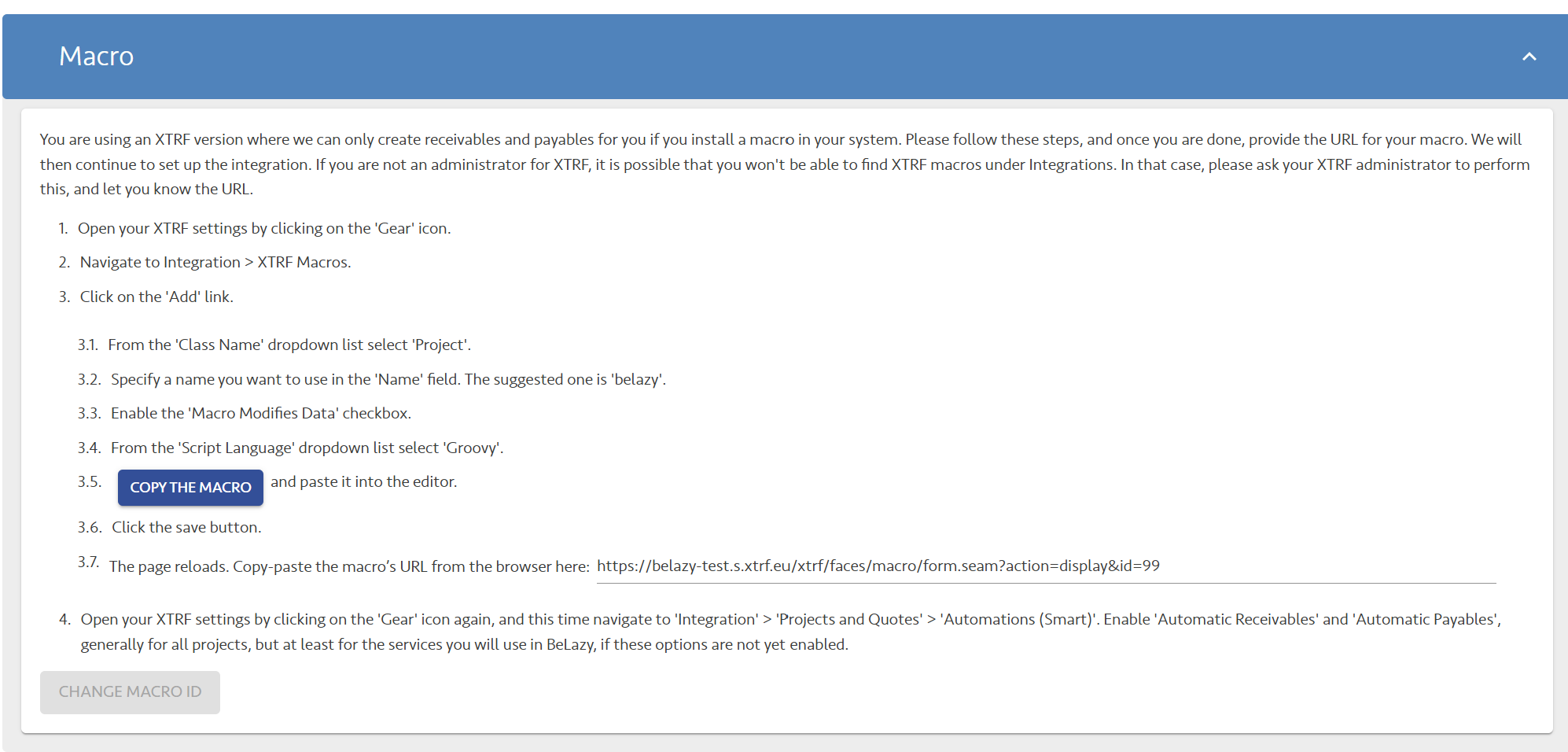
- You need to install a macro in XTRF that we have written, and parse its URL into BeLazy. If you need to install it and you don't have an account to BeLazy, you still can access it: https://app.belazy.cat/macros/xtrf_macro.groovy (make sure to select Class name: Project and enable Macro modifies model data, besides giving it a name like BeLazy). The person setting up the connection in BeLazy will need the URL of the installed macro.
- You can enable whether BeLazy shall trigger XTRF to set job deadlines automatically when a project is created even for jobs in the workflow that are not managed by BeLazy.

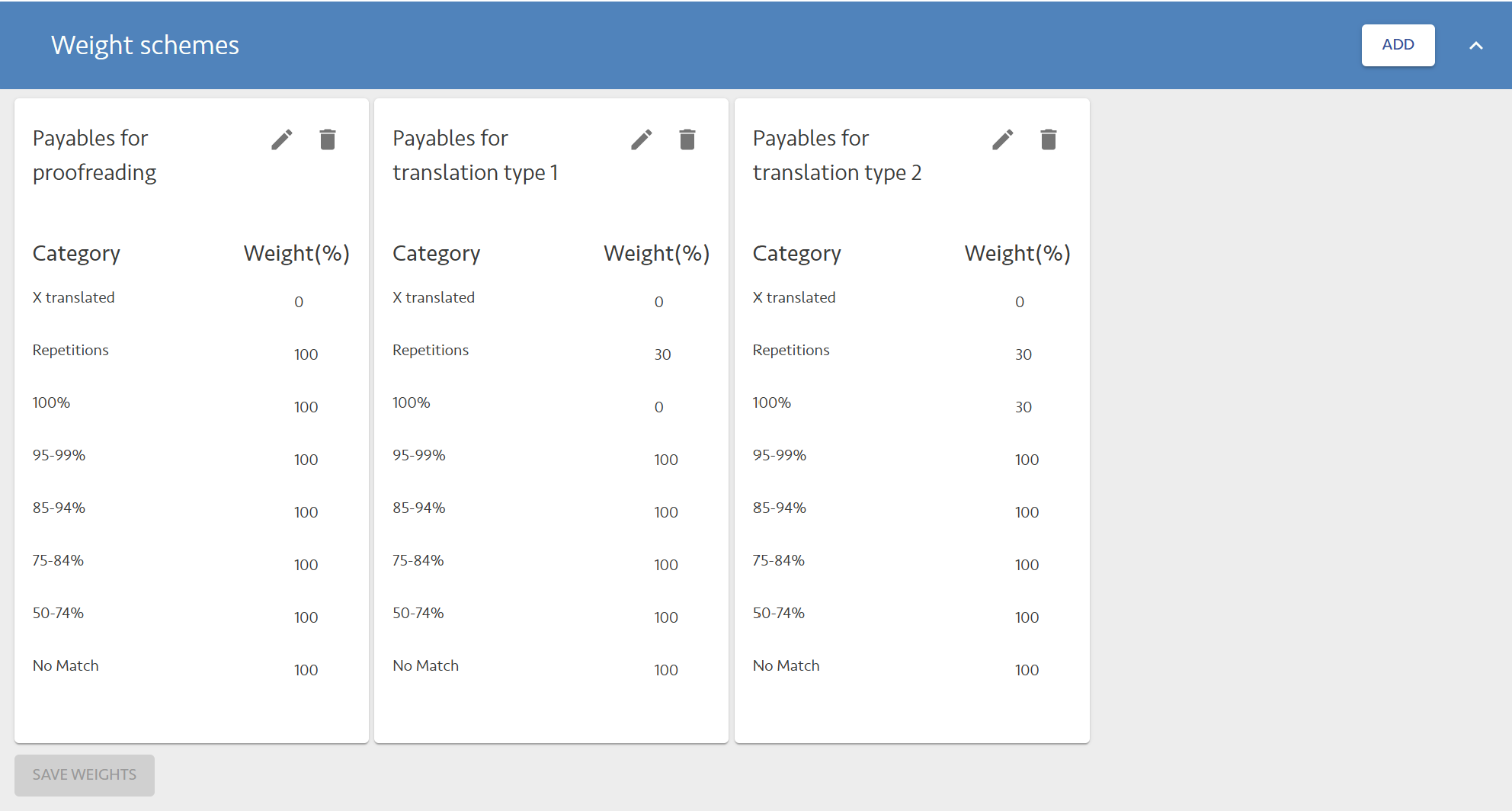
- You can add additional Weight schemes to be used with XTRF for receivables and payables. XTRF only allows you store one weight scheme per price profile, and assign one price profile per workflow, but sometimes you want to, for example, pay for every word except of the locked words to a proofreader, or pay different percentages depending on whether a job is classic translation or machine translation post-editing. You can create and use as many weight schemes as you wish. This is advanced functionality that is required for full hands-off project management in XTRF.
- The actual connection configuration goes through each and every step that maps data from the origin system to XTRF.
Troubleshooting:
- Check if the automation of receivables and payables is correctly configured if the finances are not set.
- Check if the macro settings are correct and macros are enabled if the finances are not set and the previous step did not solve your problem.
- Check if the macro is up-to-date. BeLazy will give you a notification.
- Check if the project view named 'belazy' is shared with all the right groups in the organization.
- Check if in the default price profile of the customer, or the price profile you are using, the default CAT tool is set to Other. It's under Clients / Rates / Price profiles. If it is XTM or SDL Trados Studio, please change it, as it is not possible in XTRF to manipulate these price profile types via macros or APIs. This is not a problem - BeLazy will take care of the mapping to make it work for you.

- Similarly, make sure that under your Client and Provider settings in Configuration the Default CAT tool is set to Other, as on the screenshot below.

- The full automation requires extra configuration if you are using Classic Projects. Please follow the instructions here.
- Full automation only works for projects that are in Started stage. If the project is only Accepted, and not Started, you won't be able to deliver. (You wouldn't be able even if you were trying it manually.)
- In Smart Projects, only files assigned to jobs are handled. Do not add files under the general Files section, but select the last job, and in the right-hand panel, click Add Files under Delivered in this job to add a file that will be delivered by the automation. Only Translated Document files are being returned to your customer.
- For the delivery of files from Smart Projects, you need to have the deliveries verified in the last job (see the job details on the screenshot below).

Reducing the number of customers read by BeLazy:
- In some cases you can have too many customers in the system, but only some would you use BeLazy for. In this case, go to Settings / System Values: Advanced / Categories, and define the category BeLazy or Automation, as per your preference. Either of these two works equally well to limit customers. Enable the category for clients only.
- Select the clients you want to use BeLazy with, and on their Main data page, enable the category you just created for these clients. BeLazy will only read these clients' information.
- If you don't set this up, BeLazy will read all your clients.
Functionality supported:
- All known project creation scenarios are supported
- Project delivery is supported
- Vendor reassignment is supported
- Both Smart Projects and Classic Projects are supported
- Bundling of projects coming from the origin system in XTRF is supported
- The API user should have at least the same rights as a senior project manager
Functionality not supported:
- Files above 3 GB are not handled.