
By default, most of your projects should go through automation seamlessly. After all, that's your goal. But as we are connecting different systems, different nomenclatures, certain actions can confuse BeLazy, or require user input.
For example:
- Connection issues:
- User/password is wrong or user does not have the right to perform an operation
- Communication with one of the systems failed - for example, the system is down, or behind a firewall
- It is necessary to enter a 2-factor authentication code
- Mapping issues:
- Origin system's value is not mapped to destination system's value (a new value has been added to origin system)
- Origin system's rate is not mapped to destination system's rate (a new value has been added to origin system)
- The mapped value no longer exists in the destination system (deleted after mapping)
- Data loss issues:
- Somebody deleted some jobs in your business management system or translation management system
- Somebody deleted the entire project in your systems
- Import issues:
- A file could not be imported into a TMS project, for example because it is not supported or because it is corrupt
- Incoming project issues:
- Project has been suspended or deleted since last sync
- Unexpected data or currency, for example monolingual projects
- Project creation issues in the business management system:
- A template mismatch prevents the project to be created in your business management system
- We managed to create the project in the destination system but certain fields could not be transferred
- Simply information about contact persons:
- New contact has been added in the destination system
Notifications always appear on the top bar:
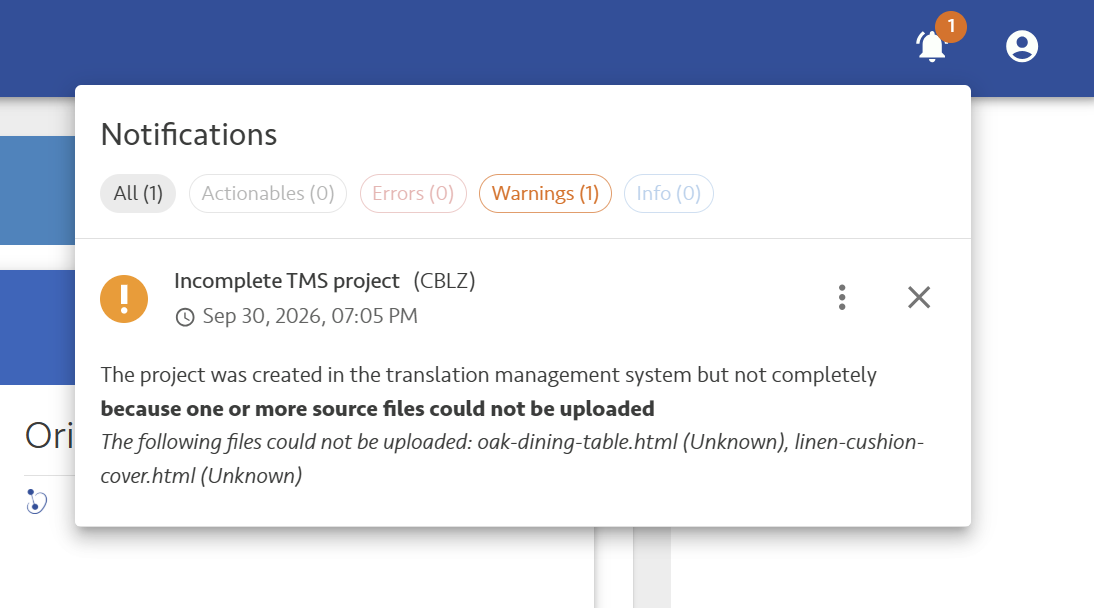
Some of these notifications, like mapping-related notifications, or user/password issues can be resolved on the spot. These are what we call Actionables. Others are Errors, probably something failed and BeLazy cannot continue automating that project. Warnings are mostly things that need your attention - we may have done something right or wrong, we cannot be sure. And Info are just information - mostly for you to know about it. You can filter the notifications according to the severity with the little icons.
BeLazy does retry everything several times, therefore it may happen that a notification is no longer valid - but we still offer you insight into past issues. For example, it may be that we managed to deliver a project now, but earlier the client's system was down. This is normally not very interesting - unless the downtime coincides with your delivery deadline. Therefore in each card you see the last occurrence date as well. If what you see there is something in the last 30 minutes, the issue is probably live and still affecting you. If it is older than that, there may have been some failed attempts, which later got resolved.
It is very important to always review notifications. If you click on the three dots, you will see more information relating to the issue. If you need support from BeLazy, send over a screenshot of both the issue's initial card, and the details card as well, and if there is an identifier of a project, opportunity, connection, etc., also send that over - troubleshooting will be much easier.
Actionable notifications have one to three buttons that you can click. For example, if there is a project that arrives in a language you don't have mapped, the project creation is on hold until you tell the system what is the equivalent of that language in your business management or translation management system.
Clicking on X next to the notification dismisses the notification - you won't see it anymore, unless the issue occurs again.
Tip: Always start your work resolving any notifications. Keep the number of notifications down to zero.