
Trados Enterprise (formerly RWS Language Cloud) is an enterprise translation management system offered by RWS. BeLazy supports vendor workflows across multiple Trados Cloud editions including Trados Enterprise, Trados Accelerate, and Trados Team. These systems are used by enterprises, mid-size companies and language service providers for managing localization workflows, with language service providers working as vendors through sophisticated vendor portal and project management capabilities.
Use cases:
BeLazy supports integration with Trados Cloud platforms through a comprehensive connector that enables seamless workflow automation across different editions. There are two main use cases where the Trados integration comes in handy:
- Your customer uses a Trados Cloud platform (Enterprise, Accelerate, or Team edition) and assigns vendor orders to you through Vendor Order Templates (VOTs), and you want to automatically manage quote reviews, task assignments, and project delivery in your business management system.
- You need to efficiently handle Trados vendor workflows including quote approval, package downloads, task reassignment, and delivery coordination while maintaining centralized project management across multiple enterprise and mid-size customers.
BeLazy connects Trados Enterprise, Accelerate and Team with any business management system or tracker, and allows:
- Order and task listing with all details, including full pricing and analysis information,
- Project creation in a business management system or tracker from Trados Cloud vendor assignments,
- Linguist assignment monitoring in Trados Cloud, and reassigning linguists in the business management system or tracker (when vendor user has project manager permissions),
- Linguist assignment monitoring in the business management system or tracker, and reassigning linguists in Trados Cloud,
- Project package download with configurable download settings,
- Delivery through return package import with automatic status verification,
- Quote review and approval workflow automation with configurable auto-acceptance.
Integration type:
The Trados Cloud integration utilizes internal APIs used in the Trados Cloud interface communication. While Trados offers public APIs that require service user creation with Client ID and Secret, BeLazy uses the non-public API approach because service users can only be created by tenant admins, which is often not achievable for vendors. This implementation obtains Bearer tokens through username/password authentication and supports multiple authentication methods including direct login and 2-factor authentication.
Requirements:
You need your Trados Enterprise username and password with vendor user permissions. The system uses a multi-tenant approach where users can be part of multiple tenants, and you'll need appropriate access to the customer tenant(s) where you receive vendor assignments. You need to be able to enter MFA codes.
Expected URL format:
The URL format depends on your Trados Enterprise region:
- EU region:
https://eu.cloud.trados.com - Canada region:
https://ca.cloud.trados.com
At the time of writing, these are the two primary regional deployments available.
Trados Cloud-specific configuration:
Supported Trados Cloud editions:
- Trados Enterprise: Full enterprise TMS with unlimited workflow customization, vendor management, quotes, and TQA - designed for large global organizations
- Trados Accelerate: Out-of-the-box enterprise capabilities with pre-built workflow templates, vendor management, and financial tracking - suited for mid-size companies
- Trados Team: Collaborative platform with light workflow tailoring and shared assets - suited for localization departments and LSPs
Note: Trados Ignite and Trados Go do not support vendor workflows and are not compatible with BeLazy integration.
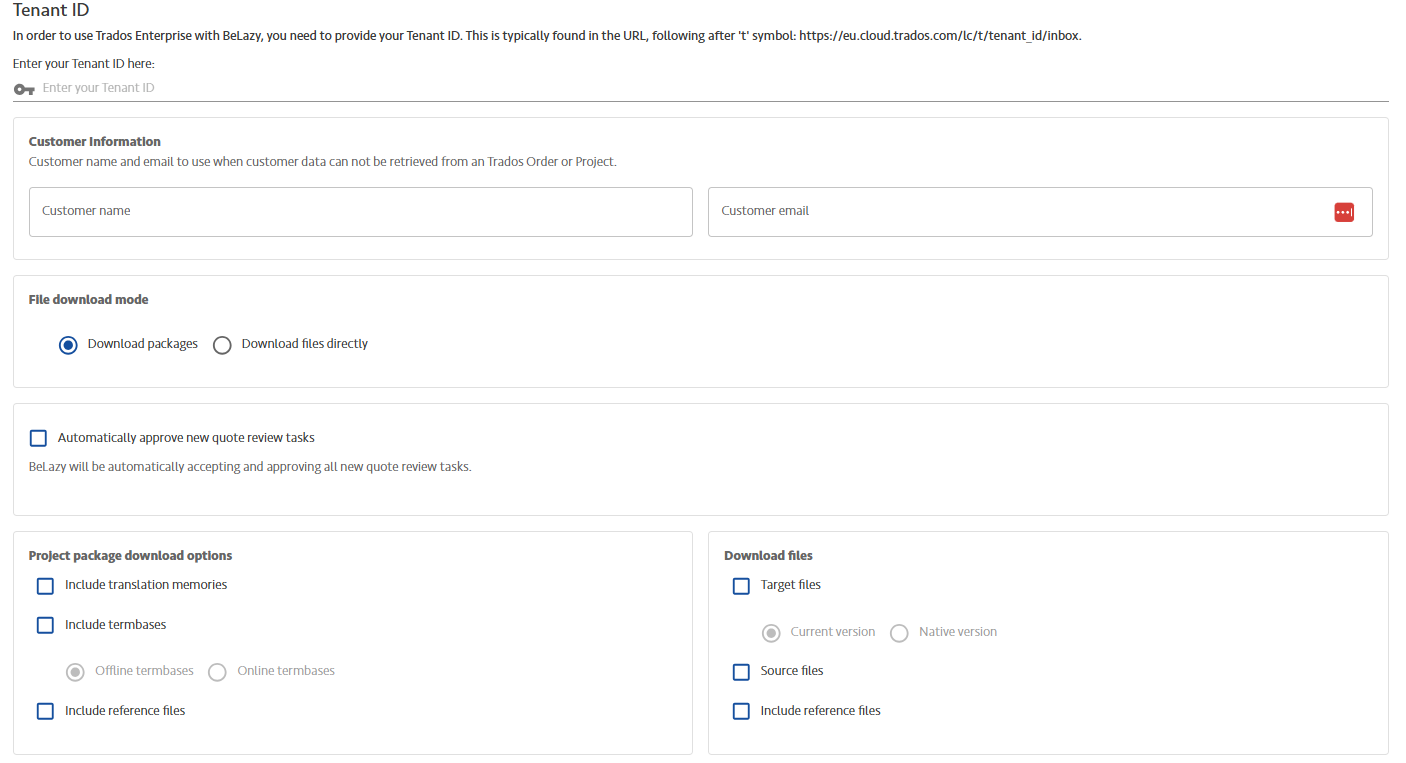
Tenant ID: Enter the Tenant ID here. You need one Trados Cloud connection per tenant. One end-customer is usually one tenant. The tenant ID is a series of characters found in the Trados URL that you see in the browser once you are logged in (found in the Trados URL after /lc/).
Customer information: Here you can enter the customer's name and email if Trados does not provide it. This will be used as contact person details in your business management system. Only use this if you are receiving red flags. By default, customer information comes from the customer folder structure in Trados Cloud. This capability is required because in default Trados role configurations this information may be unavailable for vendor users.
- File download mode: There are two primary modes available: Download packages, which downloads complete SDLPPX project packages including SDL project file, SDLXLIFF files and all configured resources, or Download files directly, which downloads individual SDLXLIFF files without the SDL project wrapper. Depending on the selection, the Project package download options or the Download files configuration will be applied, respectively, and the other configuration ignored.
- Automatically approve new quote review tasks: The vendor quote acceptance workflow in Trados Cloud slows down automation. However, Trados Enterprise and Trados Accelerate already include a calculation using your vendor price list. BeLazy can automatically approve vendor quote review tasks, without you having to look at them. The approved quotes immediately return to the customer. If customer has a quote review step, the project waits for customer approval. If no customer review step exists, the project immediately switches to translation phase. Otherwise the project appears in the opportunity list once the quote was approved by the customer. If you disable this option, you need to go to the Trados user interface to view the quote, make adjustments (e.g., add DTP costs, additional services) and manually confirm the quote. The project only converts to opportunity after manual quote approval in Trados. Declined quotes will not become projects.
- Project package download options: Configure these options to set up what the downloaded project packages should contain. The options are identical to the options on the Trados user interface.
- Download files options: Configure these options to indicate to Trados what individual SDLXLIFF files it should download. Disclaimer: target and source files are SDLXLIFF files, not original format or exported target files. Important: The "download files" settings only apply when "Download Files Directly" mode is selected. Package download options are independent.
Functionalities and connector-specific information:
- Unit of acceptance: OrderId-Batch combination, as new file uploads create new batches with new quotes/orders. BeLazy retrieves tasks with "in progress" or "created" statuses. All orders start with Vendor Quote Review task (can be auto-accepted via configuration). After quote acceptance, actual work tasks (Translation, Review, etc.) become opportunities. Translation and review tasks are created as separate tasks per file and target language, engineering tasks are created as single task per project. Both tasks and projects have due dates, and BeLazy uses the lowest due date from all tasks belonging to the same order.
- Workflow management: The workflow is not visible for vendors, only the tasks, job bundling allows you to recreate original workflow and put different tasks into a sequence.
- Multiple target languages: Supported - orders can contain multiple target languages with separate tasks per file/language
- Specialization, end client, workflow: Customer name extracted from task metadata; specialization not available in Trados Enterprise (customers sometimes use custom fields)
- Project exclusion: Supported
- Download files: Project package or project file download with configurable settings
- Upload files: Return package import for delivery
- Delivery: Package-based delivery with import task creation and status verification
- Linguist assignment: Supported when vendor user has Project Manager permissions - can reassign tasks from Orders view
- Vendor creation: Not supported
- Project bundling: Supported, recommended bundling rules are based on projectId/orderId/batch number
- 2-factor authentication: Supported, primarily via Microsoft or Google
- Pricing: Comprehensive integration with quote-based pricing models. Supports language costs: one line per target language, per-language additional costs: conditional costs (e.g., discounts for high volume in specific languages), and per-project additional costs: project handling fees, surcharges, total discounts. BeLazy creates up to two pricing items, one for analysis, one for additional costs per language, and if there are project-level costs, it appears as one pricing item without target language. File-level pricing is not available due to the fact that additional costs are being applied project-wide.
- Analysis creation: Integrated with Trados analysis and quote generation