
This page only appears if you are using a Plunet business management system. In Plunet, prices are defined by three main elements: units, services, and price lists.
For example, a price line like “Words Translation 100%” is based on:
The unit (word)
The service (translation)
And a weighted rate (100% match)
This price is usually part of most customer price lists.
However, some clients might use a slightly different setup — for example, “Words TEP 100%” instead.
Understanding the differences
In translation management systems or vendor portals, units and match rates are usually listed separately.
You’ll see “Word” as a unit, and “100% match” as a weighting. The service (like translation or review) is typically connected to the workflow, not shown directly in the price lines.
Mapping your rates
The rate and job type mapping differs slightly from a standard value to value mapping selector, because there is an extra drop-down list on top of the screen: Select the Plunet job type.
Under Admin / Prices in Plunet there is a service and a unit associated to each price line:
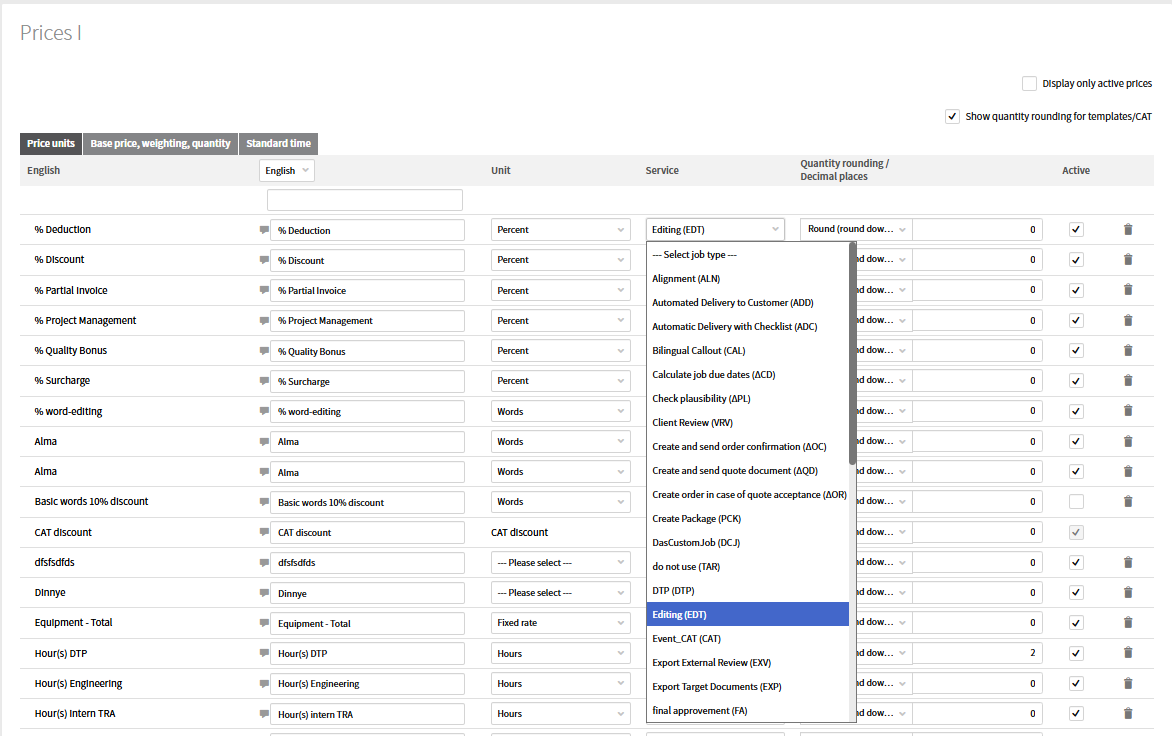
One price line can only be associated to one single service (job type) and one unit. Based on the job type you select in BeLazy, the right-side list changes: it shows all those price lines where the job type in Plunet is set to the job type you selected in BeLazy. For example, on the example below, the right side shows the price lines in Plunet that have the job type (service) Translation assigned in Admin / Prices.
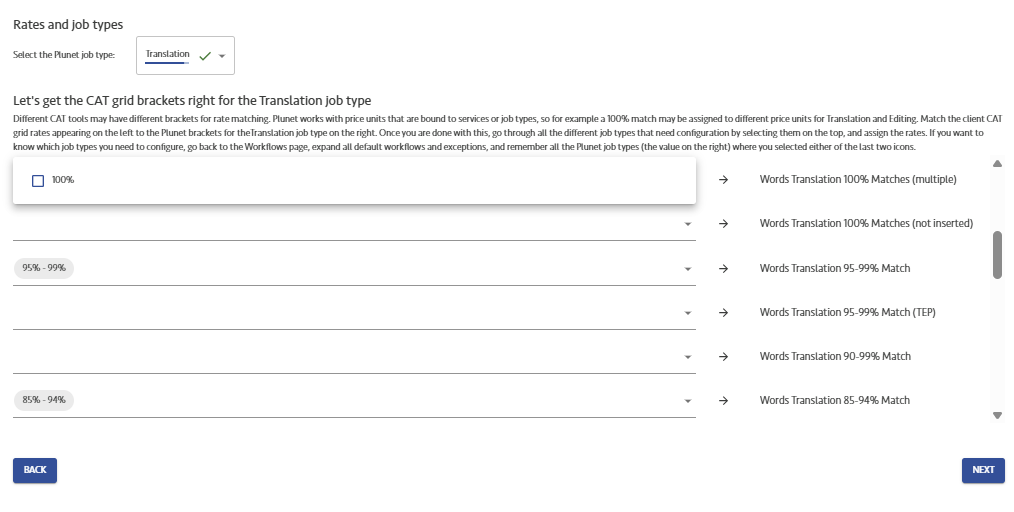
For each and every job that you want BeLazy to create payables for, you need to map the origin system's rate (left side) to the right price lines in Plunet (right side).
Which mappings do you need to perform?
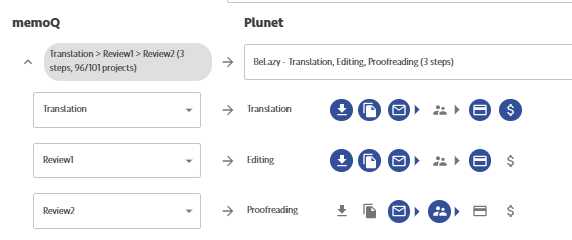
Go back to the Workflows tab in BeLazy, and check each and every workflow step's BMS job where the payable or optionally receivable creation (credit card and/or dollar sign) was selected, and set up the mappings for those jobs. For example, in this theoretical setup, Translation and Editing need to be selected, but you may have other workflows in the same connection where the target steps are mapped to different Plunet jobs (workflow steps) and the payable and/or receivable creation is activated.
What are the Independent item prices (receivables)?
In Plunet, receivables are item prices charged to the client and payables are job prices charged by the vendors. Sometimes you may want the vendor to charge Translation in the above example, however, the client must be charged a different, joint price for translation, editing and proofreading, TEP. The job list only shows Translation separately, so BeLazy must learn to take different price lines than the job-related price lines.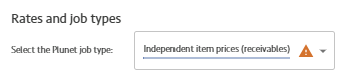 If you select Independent item prices (receivables), and associate prices to the right-side (long, unfiltered) price list, those will appear as item prices. Important: this will only work if there is one single workflow step (job) in the workflow where receivables are activated. If you activate receivables for more than one job, BeLazy will take the job-related pricing, the same price lines as for payables.
How price lists work in Plunet with BeLazy
BeLazy’s integration with Plunet works a bit differently from other systems:
You can’t select a price list manually in BeLazy.
Instead, Plunet automatically chooses the price list based on the customer (set in the first step), the order template and the price lines matched in each project.
To ensure accuracy, we recommend opening the customer’s price list in Plunet and confirming that the price lines you select in BeLazy are exactly the same ones included in that list.
Be careful with small naming differences — for example, Plunet might include both:
“Words Translation No Match”
“Word(s) Translation No Match"
The difference may look minor, but it matters.
Minimum fees and discounts
So far we talked about the Workflow based mapping page. Unit mapping also exists in Plunet as a separate page, however, its importance is much lower than in other systems. It is mostly to mark non-word-based analysis, minimum fees and discounts. Whatever you set up for word-based units does not matter - we recommend that you assign word to Word(s) Translation No Match. Non-word based units cannot be converted to job-based units, if you have a situation like this, you need to use the BMS Extension APIs - get in touch with BeLazy's support for help.
Some vendor portals (like Lionbridge LCX) clearly mark projects that qualify for a minimum fee.
Others (like XTRF) apply minimum fees indirectly — you can spot them when the total price is higher than the word-based calculation.
Discounts work the same way, but in reverse: the price will be lower than the sum of all word prices.
In Plunet we recommend setting up a flat fee price line and a discount price line, and do not use the %-type discount price lines - if the customer asks from you a 5 USD discount, it will be interpreted as a 5% discount.
Choosing how to handle minimum fees
You can decide how to register minimum fees in BeLazy:
Minimum Fee Difference (recommended):
Creates two receivables — one for the actual words and one for the fee difference.
For example:10 words × €0.10 = €1
Minimum fee = €10
→ Two receivables: €1 (words) + €9 (fee difference)
Flat Fee Lump Sum:
Creates a single receivable for the full €10, and the analysis is transferred with a price of zero.
Using Minimum Fee Difference gives you better visibility into how much you earn or lose if a client negotiates your minimum fees later.