
Crowdin (https://store.crowdin.com/categories/cms) is not only a translation management system but also the TMS with the most connectors. Also, Crowdin offers one integration free in its free tier, and offers two integrations in its lowest-cost tier, which makes it the ideal tool to get started with integrations. BeLazy and Crowdin are partners, and BeLazy is bringing Crowdin's connectors into other, document-oriented TMSes such as Phrase or memoQ, connecting the Crowdin-integrated content to both a TMS and a business management system or tracker. Crowdin is BeLazy's preferred starting point for connectors. Crowdin's connectors work so that content from the origin system is manually or automatically imported into Crowdin projects, and BeLazy creates the necessary Crowdin tasks, picks up these tasks and processes them (if you translate outside of Crowdin, by downloading the XLIFF and creating a TMS project in the other TMS), and delivers the completed translations back into Crowdin (by automatically uploading the translated XLIFFs), closing the tasks - exactly the way you would do manually.
Use cases:You or your customer use one or more of the Crowdin supported content management systems and would like to automate the ordering and the management of translation and localization. Use this integration if one or more applies:
- You want to centralize all the work in BeLazy.
- You want to mix and match connectors - use Crowdin connectors and process them in the TMS of your choice.
- You want to introduce machine translation or LLM-based translations for such content outside of Crowdin, in a way that the same engines with the same configurations can also apply to other content coming from different sources.
- You want to process the content in your business management system, or want to enable a tracker for all your projects, both those coming from Crowdin and from other sources (Plunet, XTRF, Protemos, Quahill, or any other integrated tool on the one hand, BeLazy's Google Sheet integration on the other hand).
- You want to use the TMS (CAT) integrations of your business management system (such as Plunet or XTRF).
Requirements:
Only a Crowdin subscription and a BeLazy subscription are necessary, the integration works in every situation. You first set up the Crowdin account and connector, and then connect BeLazy to it.
Expected URL format and configuration:
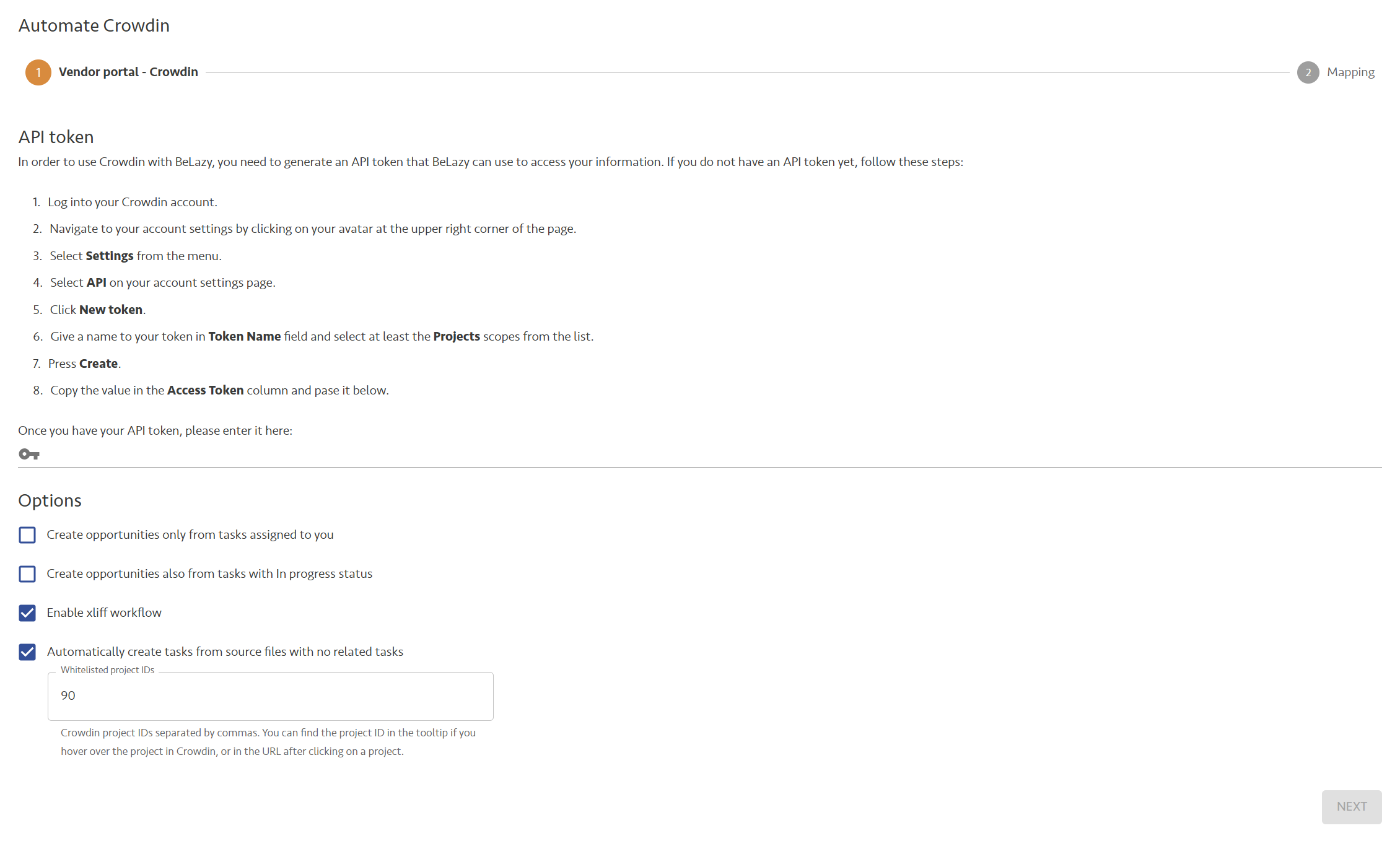
Configuration is the same as the standard Crowdin configuration. BeLazy works both with Crowdin.com and Crowdin Enterprise equally well. Make sure that you enable the XLIFF workflow on the configuration page, and that you enable the option Automatically create tasks from source files with no related tasks. Crowdin by default does not create tasks from new content imports, this is a manual step. BeLazy automates it. Under whitelisted projects, enter the ID of the project that you can find in the URL that Crowdin displays when you select the project in its interface (normally a 1-2 digit number).
Functionality supported:
- Receiving and delivering all translations from any Crowdin CMS integration is supported.
Functionality not supported:
- No known missing functionality.
Additional information:
Crowdin and BeLazy are partners, so if you need support with the integrations they support and a single contact, you can contact BeLazy and we will coordinate with Crowdin on your behalf.