
This article describes the direction where BeLazy imports source content from the Content and Project Hub and creates and manages a project in Crowdin Enterprise. BeLazy has two Crowdin integrations, the other one is picking up content already in Crowdin and processing it in a business management system or allowing the translation to happen in another translation management system, which you can read about here and here.
Crowdin Enterprise has a unique pricing proposition, as its cost depends not on the number of words going through, but the number of words at the same time in the system. However, Crowdin is not particularly easy to use for translation companies, because no integrations exist for the major business management systems, and its concept of projects, files and tasks is very different from the mainstream document-oriented TMSes. On the other hand, Crowdin is a powerful tool. BeLazy teamed up with Crowdin to improve the ways how Crowdin can be used in a traditional localization settings. The Crowdin Team+ license is enough for BeLazy users, and in order to minimize the total cost of ownership for owning a TMS, BeLazy cannot only create projects, but archive them at every workflow step and at the end of the project delete the corresponding content from Crowdin Enterprise. This way the combination of Crowdin and BeLazy is probably the most affordable solution to get a full localization operation running with business management capabilities, both for enterprises and translation companies.
Terminology:
Crowdin Enterprise has a different concept of projects, because it was meant to work with software code. In a way, Crowdin is more a CMS, because it has a full repository of strings. Therefore, similarly to software development environments like Git, a project is mostly meant as a code base project, rather than a translation project. Projects have files in it, which consist of strings, and which can be translated as tasks.
Therefore, a project holds content, including the content you import. Projects have folders, to make the storage of content easier, and several projects can belong to one project group, which just makes navigation and ownership easier. Files and strings are the entities that are uploaded to a Crowdin project or a folder within a Crowdin project, but these are not automatically offered for translation. Human translation happens in tasks. Tasks are bilingual jobs which can be assigned to people and which have a deadline and a type, translation or proofreading.
What value BeLazy adds:
Crowdin started out as a crowdsourcing tool, which allowed many contributors to the same translation (imagine a group of fans localizing open-source software), and therefore there can be not only one responsible assignee but several in each and every task. In traditional localization connected to business management - assignment being the basis for responsibility and pay - not being able to limit access to a task means that the lines between the several workflow steps are blurring. Also, Crowdin only offers two segment statuses, segments that are translated and proofread, and only two step types. Therefore, without an external storage for snapshots of the documents in all the different workflow steps, it is not possible to trace back what each contributor did in each workflow step. Crowdin works well in itself in the case of projects with two workflow steps, but if you require more human touchpoints, without extensions it is hard to keep track of who did what and who changed what.
BeLazy levels the workflow functionalities of Crowdin Enterprise with the workflow functionalities of all other supported TMSes by taking over the control of assignments and archival of each workflow step. BeLazy also makes Crowdin cost-effective without extra manual work by removing the uploaded files automatically from the system once all the workflow steps in the project have successfully finished. The translation memory is updated in Crowdin, and each and every workflow step's XLIFF files are automatically archived in BeLazy, so despite deleting the source from Crowdin, you do not lose any data.
How the BeLazy Crowdin Enterprise integration works:
1. BeLazy imports the files into a pre-defined Crowdin project, creating a new folder
When a project is ready to be set up in Crowdin, BeLazy chooses the Crowdin project the content should be imported to based on your configuration. BeLazy does not create Crowdin projects. Projects work like project templates in other systems, they define file filters to be used, automated actions and other properties.
2. BeLazy waits until Crowdin pre-processing is done, if it is configured
BeLazy then creates a folder for each and every assignment, and imports the files in the BeLazy project into this folder. If Crowdin is set up to perform AI pre-processing, BeLazy waits until it is done. In this case, the translation will be performed by Crowdin automatically, and all tasks will automatically default to proofreading tasks.
3. BeLazy instructs Crowdin to perform an analysis
Once the pre-processing is done, an analysis report is created by Crowdin Enterprise, and this will be the basis of the Business Management Hub (Google Sheet or BMS system) project.
4. BeLazy creates Crowdin tasks
BeLazy creates as many Crowdin tasks as you configure in your BeLazy workflow configuration. In the case of workflows with many steps, you can create as many translation tasks as you wish, and for the last workflow step you can choose to create a proofreading task.
5. BeLazy tracks your business management system project for workflow assignments, and adds and removes vendors from the tasks to ensure that always a single vendor can work on a workflow step
This is where the Crowdin Enterprise TMS integration is very different from the other integrations. BeLazy actively manages the Crowdin Enterprise project, and ensures the accountability of each vendor by not setting up access to every vendor when tasks are created - because then they could overwrite each other's translations -, but rather giving access when the workflow reaches a step with a vendor assigned, and removing access when this task by this vendor is done. This way there is always exactly one linguist assigned to each and every workflow step and Crowdin task.
6. BeLazy exports the files and delivers them in the origin system
Files are exported from Crowdin and uploaded to BeLazy, which then can trigger source system delivery (e.g. back to the customer portal, or to the TMS or vendor portal where the project came from).
7. BeLazy cleans up Crowdin, removing the files and optionally the folder
This is optional and configurable, but this functionality exists to save you costs in Crowdin.
Use cases:BeLazy supports setting up projects in Crowdin Enterprise from any of the connectors available under the Content and Project Hub. You would typically use this integration if you receive source files from the customers in any of the systems (customer portal, Email Assistant, vendor portal, CMS integration, task tracker integration, or simply the project ingestion API), or if you are receiving projects in another TMS, and would like to process the content in Crowdin Enterprise by exporting XLIFF from the other TMS and importing the translated steps back there automatically at the end of each workflow step.
In this integration use case you are setting up projects in a dedicated Crowdin Enterprise instance, which is typically your preferred TMS, or you are helping your customer with project creation in their system.
The integration:
- imports the files received into a folder created by BeLazy using the file import settings in the Crowdin project,
- creates the necessary tasks in Crowdin Enterprise,
- manages and synchronizes data and the workflow between Crowdin Enterprise and the business management system or the Google Sheet project management tool (the Business Management Hub),
- reassigns vendors set from the business management system or the Google Sheet to Crowdin Enterprise,
- monitors task completion in both Crowdin Enterprise and the business management system or the Google Sheet jobs, and closes the task/job in the other system,
- exports the entire content into XLIFF at each and every workflow step and stores it in BeLazy,
- imports the uploaded XLIFF content back into Crowdin Enterprise when closing a business management system or Google Sheet job,
- allows manual and automated jobs in the workflow,
- works with both Crowdin's own AI capabilities and the BeLazy AI Hub.
The integration:
- imports the files received into a folder created by BeLazy using the file import settings in the Crowdin project,
- creates the necessary tasks in Crowdin Enterprise,
- manages and synchronizes data and the workflow between Crowdin Enterprise and the business management system or the Google Sheet project management tool (the Business Management Hub),
- reassigns vendors set from the business management system or the Google Sheet to Crowdin Enterprise,
- monitors task completion in both Crowdin Enterprise and the business management system or the Google Sheet jobs, and closes the task/job in the other system,
- exports the entire content into XLIFF at each and every workflow step and stores it in BeLazy,
- imports the uploaded XLIFF content back into Crowdin Enterprise when closing a business management system or Google Sheet job,
- allows manual and automated jobs in the workflow,
- works with both Crowdin's own AI capabilities and the BeLazy AI Hub.
Integration type:
The Crowdin Enterprise integration utilizes the official APIs of Crowdin Enterprise. Every Crowdin Enterprise user has access to this integration at no extra cost.
Requirements:
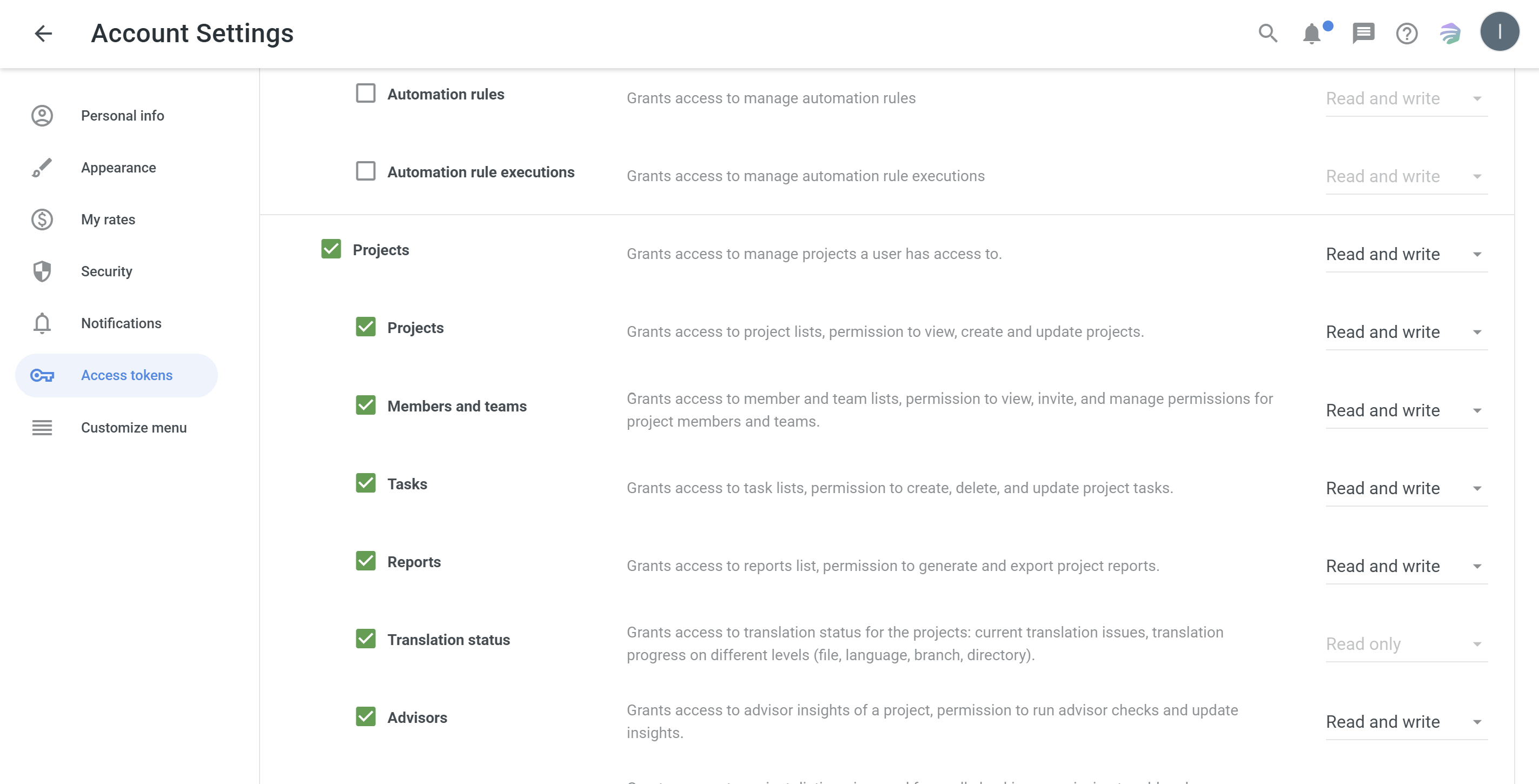
The integration requires the user to set up an API key with at least the Projects scope fully enabled for read and write. Click on your avatar at the top right corner, and select Account settings, the first option. Create a new token, give it a name and an expiry date, and select the Projects scope from the list. Pay attention to the expiry - you will need to refresh the token in a year or earlier. You will need to enter the created API token into BeLazy.
Setup:
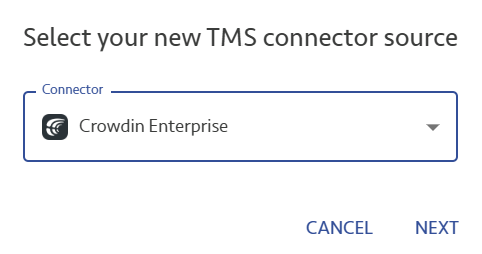
Under Manage my translation management system in the Profile menu, add a new TMS connection:
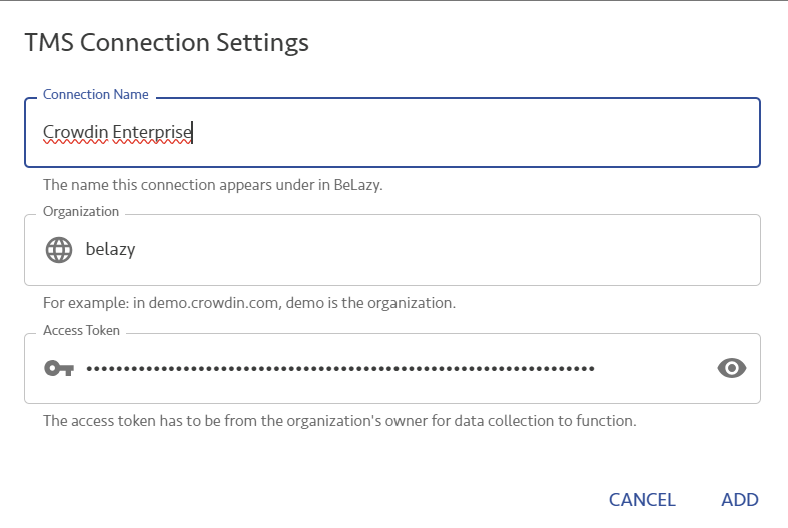
Under the TMS Connection Settings, choose a name for this connector, enter your organization's name, which is the first part of your Crowdin Enterprise URL, before .crowdin.com, and enter the access token you created. Click Add.
Crowdin-specific configuration:
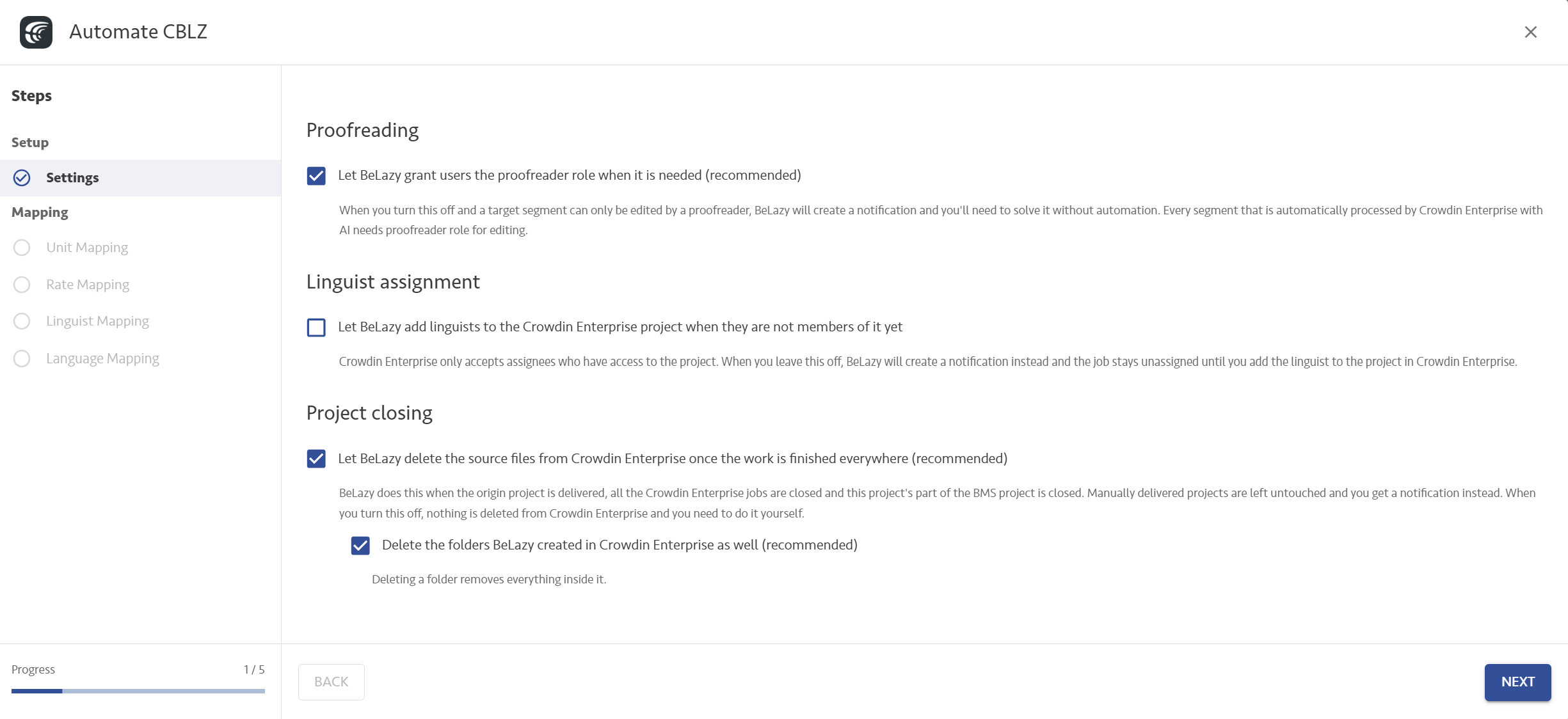
Click on the cogwheel icon to automate the connection. You will see the following dialog:
Proofreading:
This is a control vs convenience functionality. If you perform AI translation / text preparation in Crowdin, a user with the translator role won't be able to edit the text, only a proofreader will. If your user has no proofreader rights in the project, we cannot assign them to a proofreading task. Enable this option if you automatically want the user to be promoted to proofreader if otherwise they would not be able to work on the task without human intervention.
Linguist assignment:
In Crowdin Enterprise projects linguists are first assigned to the project, and the users you can choose from are the ones that are assigned to the project. This brings you control. However, when you are assigning the linguists from your business management system, you may not have them in the given Crowdin project yet. If you enable this checkbox, BeLazy automatically adds them to the Crowdin project. Otherwise you will get a notification.
Project closing:
If you enable Let BeLazy delete the source files from Crowdin Enterprise once the work is finished everywhere (recommended), BeLazy automatically deletes the source files after successful - and only successful - project completion. This is what saves you usage fees. If you disable the Delete the folders BeLazy created in Crowdin Enterprise as well (recommended), it will keep the folder name in the project, so you have some trace that it was processed.
Analysis and files:
In the case of Crowdin Enterprise, there are no analysis settings in BeLazy. That's because the analysis settings are in the Crowdin Enterprise project.
BeLazy also always exports the same XLIFF file type from Crowdin Enterprise, there is no configuration necessary.
Unit mapping, Rate mapping, Linguist mapping, Language mapping: Please see the generic article about these mappings.
Enabling the TMS project creation in a Content and Project Hub connection, and editing the automation:
For generic information, please read the TMS Hub Integrations - Overview article first.
Initial configuration - Crowdin Enterprise project mapping:
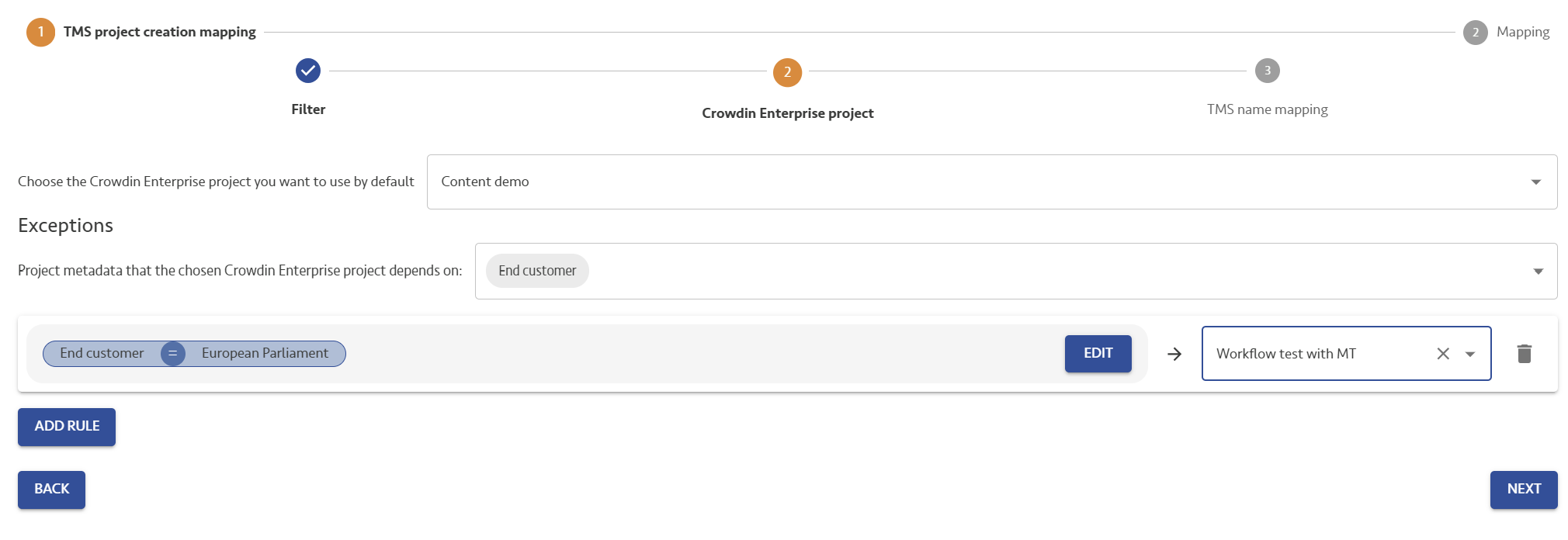
BeLazy always imports content into existing Crowdin Enterprise projects, which are already configured. Projects define analysis, file filters, AI workflows and many other things. Usually it is recommended not to have too many projects in Crowdin. You always need to set up a main, standard project, but you can create as many exceptions based on the origin project's metadata as you wish.
The workflow does not come from the project, it is defined later.
Initial configuration - name mapping:
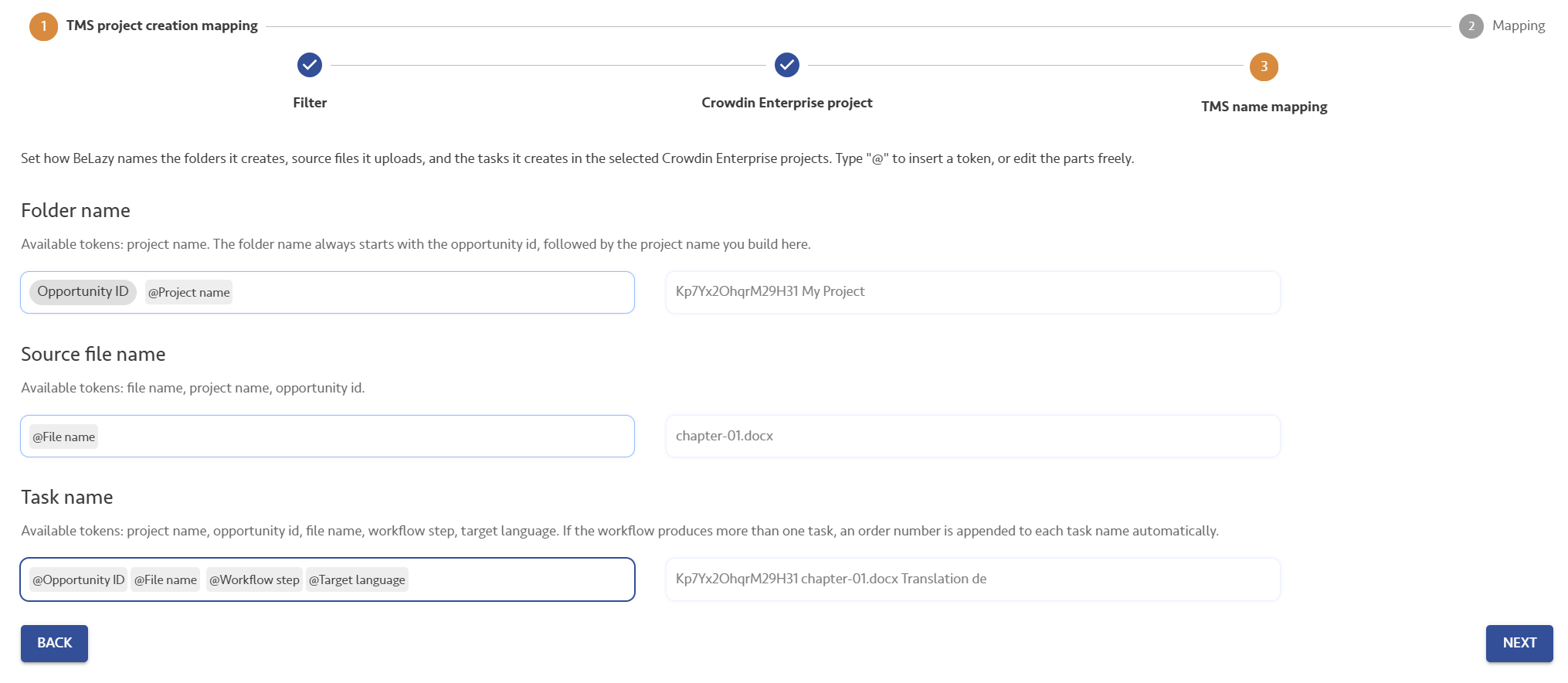
BeLazy will create a folder in the project for each and every BeLazy project, and import the project's files there, then create tasks. On this screen you can configure the default names with placeholders. You can enter placeholders if you start typing @.
Workflow configuration:
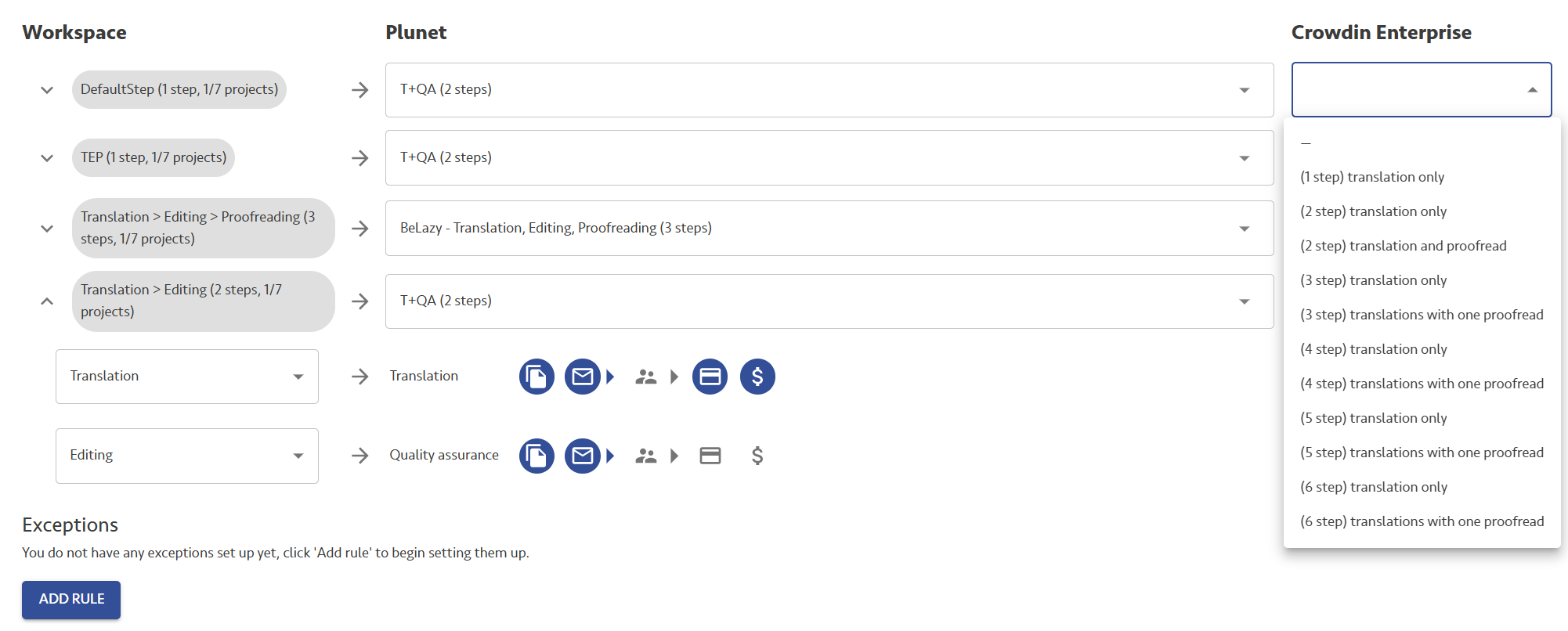
Under each and every origin workflow (in this case Workspace, could be another TMS or vendor portal or any other integration), you need to select the Crowdin Enterprise task workflow. Crowdin only allows a combination of translation steps and then one proofreading step possibly, so your main decisions are how many Crowdin tasks you want to create for the content to go through, and whether the last step should be translation or proofreading.
If you expand the workflow, you can place the actual Translation and Proofread workflow steps that correspond to the BMS workflow steps in the appropriate boxes. Read the overview article to understand the general working of TMS workflow mapping.
If in Crowdin you ran automated preparations, you will need only Proofread steps. Refer back to the Crowdin-specific configuration under Manage my translation management systems regarding enabling the Let BeLazy grant users the proofreader role when it is needed option.